



How to split screen and clone
1. First, open the app you want to split-screen.
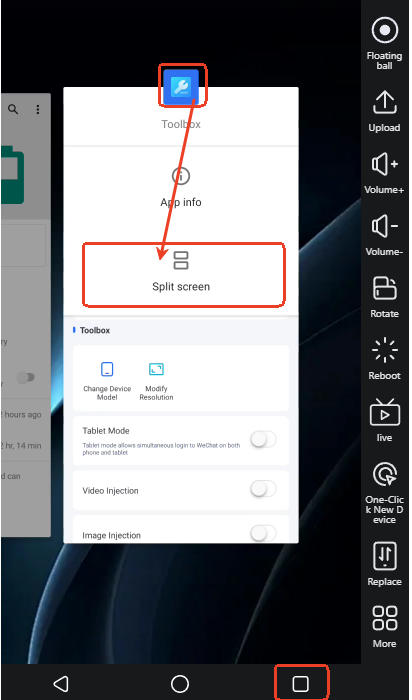
After opening, press and hold the taskbar button and long-press the app's task.
The split-screen option will then appear. Select "Split Screen" from the icon.
2. If the split-screen option does not appear, download Termux from the App Store.
Then, grant Termux root access in Toolbox (Extension Tools).
(Remember to restart your cloud server after granting root access.)
3. In Termux, enter the following three commands in sequence:
(1) su
(2) settings put global enable_freeform_support 1
(3) settings put global force_resizable_activities 1.
4. Finally, press and hold the taskbar button again and long-press the app's task.
The split-screen option will then appear.
How to run split screen?
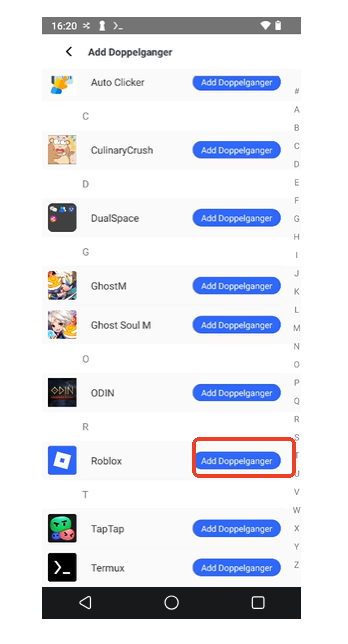
1. Download the VS Cloner app from the App Store.
Open it; it will display a list of apps on your device (if the list is empty).
2. Grant root access to the Termux app in the Toolbox.
3. After granting root access, be sure to restart your cloud device.
Finally, click the app you want to clone.