




How to Register & Log-In VSPhone Account?
1. What are my registration options for a VSPhone account?
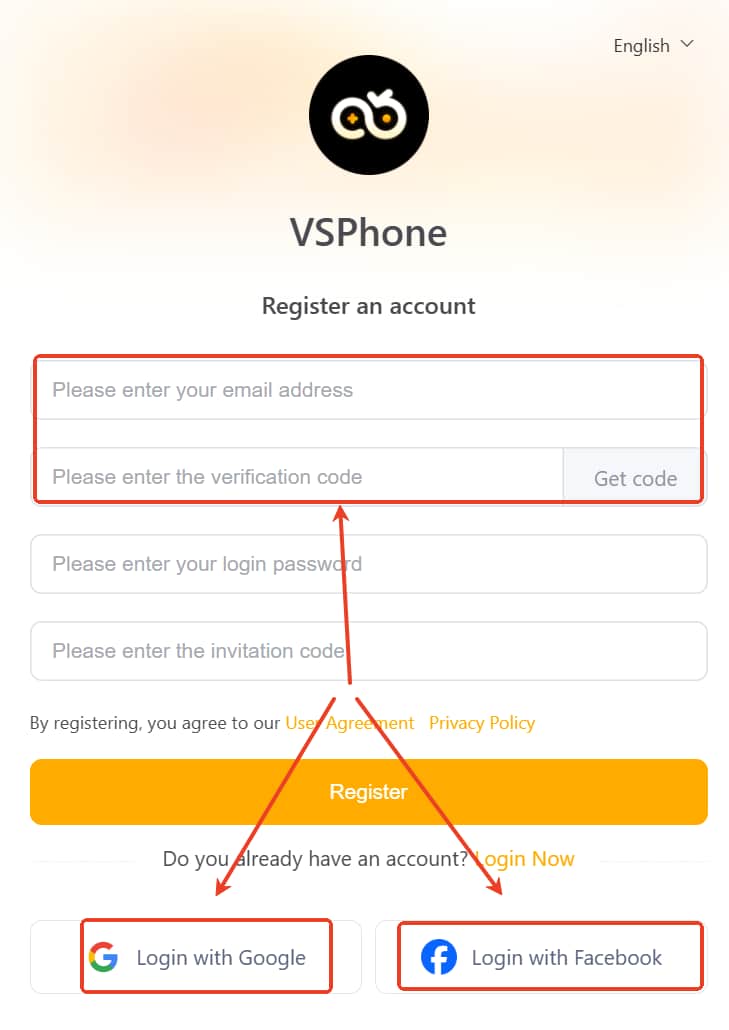
You can register a VSPhone account in two ways:
Register with Email
Log-in with a Google account
Log-in with a Facebook account
Both options allow you to quickly create a VSPhone account by using credentials you already have with those services.
2. How do I register with a Google account?
To sign up using a Google account:
Make sure you have an active Google account (e.g., Gmail or other Google sign-in). If you don’t have one yet, create it first using Google's official signup page: https://accounts.google.com/signup.
How to register the Google account: follow the Google official guideline
When you see “Login with Google” on the VSPhone registration screen, tap/click it.
You’ll be redirected to Google’s sign-in page.
Select the Google account you want to use or enter your email and password if you haven’t signed in yet.
Grant any required permissions to complete the signup.
Once authorized, you’ll be redirected back to VSPhone and your new account will be created.
Note: A Google account gives you access to all Google services and can use either a Gmail address or a non-Gmail email as the login.
3. How do I register with a Facebook account?
To sign up using a Facebook account:
If you don’t already have a Facebook account, create one at facebook.com:
Go to facebook.com and click Create New Account.
Enter your name, email or mobile phone number, password, birth date, and gender.
Click Sign Up and confirm your email or phone number to complete the Facebook account setup.
On the VSPhone signup page, choose Login with Facebook.
You’ll be redirected to Facebook to log in and authorize VSPhone.
After authorizing, you’ll be redirected back to VSPhone, and your account will be set up.
(The detailed facebook account register guideline: follow the Facebook official guideline )
4. How do I log in to VSPhone?
You can log in using the same method you used to register:
VSPhone account login: Enter your email address and login password.
Google login: select Login with Google, then choose your Google account.
Facebook login: select Login with Facebook, then enter your Facebook credentials.
VSPhone will remember the linked social account and log you in without needing a separate VSPhone password.
5. Is my account secure when signing up with Google/Facebook?
Yes. VSPhone uses secure OAuth authentication provided by Google and Facebook, which means:
Your password is handled by Google/Facebook — not stored by VSPhone.
You grant only the permissions necessary to create and log in to your account.